AnyBackupMasterServer-安装软件失败,提示错误:***The hostname <主机名> is not configured,please find the file /etc/
关键字
hostname
适用产品
- AnyBackup Master Server 7.0.6
问题描述
安装 AnyBackupMasterServer 软件失败,提示如下错误信息:
***The hostname <主机名> is not configured,please find the file /etc/hosts to complete.!***

问题影响
AnyBackupMasterServer 软件安装失败。
问题原因
安装服务器的主机名与 IP 地址对应关系未写入 /etc/hosts 配置文件。
解决方案
为了解决该问题,需要将主机名与 IP 地址对应关系写入 /etc/hosts 文件,请按照以下步骤执行:
1. 通过 SSH 工具连接 Linux 操作系统,执行如下命令,备份 /etc/hosts 配置文件。
cp /etc/hosts /etc/hosts-bak`date +%F`
2. 执行如下命令,将主机名与 IP 地址的对应关系写入 /etc/hosts 配置文件。
echo "172.17.237.103 `hostname`" >> /etc/hosts
注意:命令示例中,IP 地址为 172.17.237.103,具体以实际环境为准。
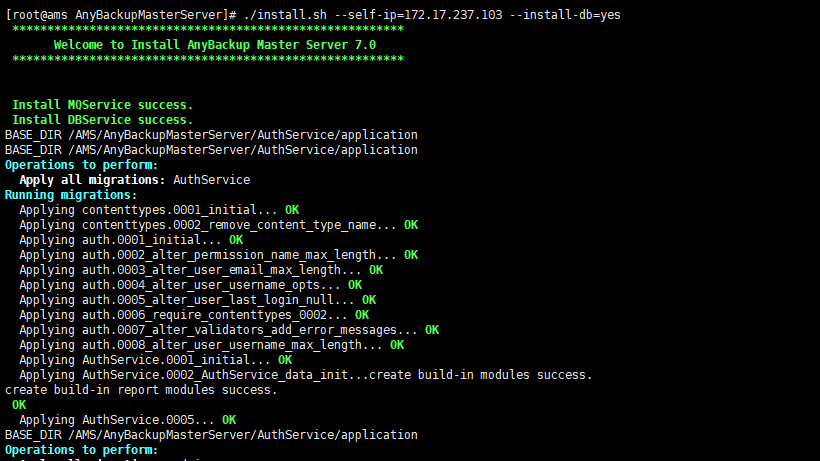
3. 执行如下命令,重新安装 AnyBackupMasterServer 软件。
./install.sh --self-ip=172.17.237.103 --install-db=yes
注意:命令示例中,IP 地址为 172.17.237.103,具体以实际环境为准。
注意:命令示例中,IP 地址为 172.17.237.103,具体以实际环境为准。
更多信息
关于设置 Linux 系统主机名的更多信息,请参考 Red Hat 官方网站:How to set the hostname in Red Hat Enterprise Linux 7?